Welcome!

Posted June 22nd, 2010 by CyberShadow in Uncategorized | 3 Comments »

This is our little Worms Armageddon Beta Update Development Blog. We’ll be using it to share details about our development process, post previews of upcoming features, and share other news of our Wormiverse!

In case you’re new around here – Worms Armageddon is an artillery / turn-based strategy game released by Team17 in 1999, and we (Deadcode and CyberShadow) are writing Beta updates for it.

W:A v3.6.31.0 Released

Posted November 16th, 2010 by CyberShadow in Uncategorized | 1 Comment »

The 3.6.31.0 W:A Beta Update was released on November 16, containing fixes for problems discovered after 3.6.30.0′s release, as well as the new map complexity sliders.

WormKit and 3.6.30.0

Posted October 28th, 2010 by CyberShadow in WormKit | 16 Comments »

Hi,

I noticed that there seems to be some confusion about WormKit‘s compatibility with the latest Beta update, so I’d like to explain this issue in detail.
Read the rest of this entry »

W:A v3.6.30.0 Released

Posted October 28th, 2010 by CyberShadow in Beta releases | No Comments »

In case you haven’t noticed, we’ve released 3.6.30.0 on Tuesday – follow the link to read the (rather long) changelog. It looks like there are a few regressions we haven’t noticed, so we expect to do a bug-fix release soon.

Wine and front-end chat

Posted September 18th, 2010 by CyberShadow in Bugs | 4 Comments »

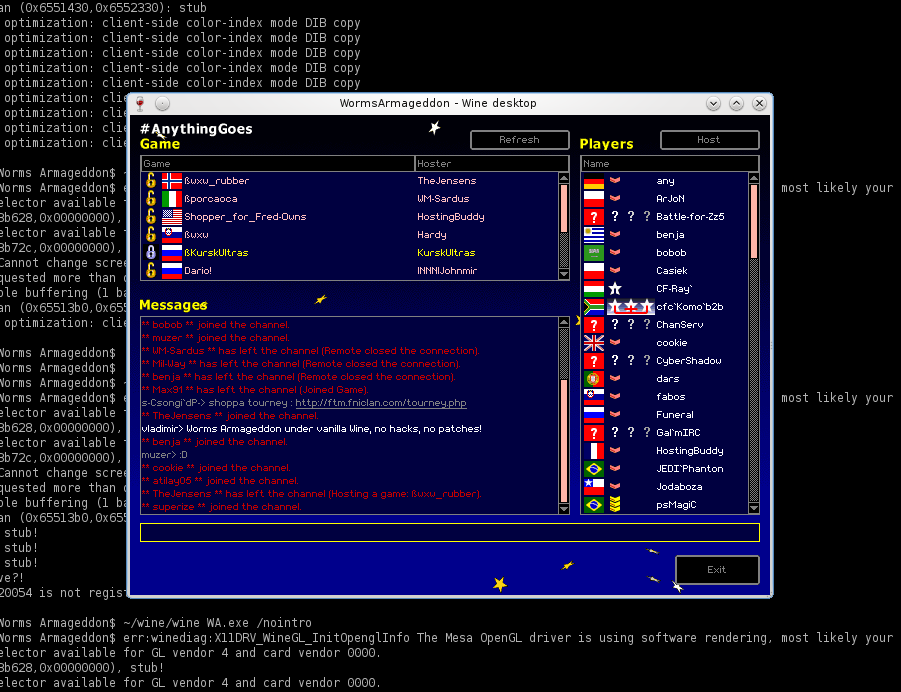
Some of our Wine users have noticed a problem in recent Wine versions – namely, chatting in the front-end parts of the game (that includes WormNET and host/join lobby) was not possible (W:A seemed to ignore Enter presses).

This was a pretty bad problem, since it made W:A close to unplayable online (you’re very likely to get kicked if you can’t talk to the host). I decided to take some time to investigate the problem. In a few days, a patch was ready, which was submitted and accepted after a few tweaks. Today, Wine 1.3.3 was released, containing the fix. Hurray!

In other news, our Wine users may be delighted to know that starting with the next Worms Armageddon update, they will no longer need a patched DirectDraw DLL. W:A will run out of the box!
W:A Beta Showdown

Posted September 4th, 2010 by CyberShadow in Uncategorized | No Comments »

OutofOrder has created this awesome video (voiced by Cueshark):

Comments and download on WormTube: http://wormtube.worms2d.info/81/wa_beta_showdown

Beta delayed

Posted July 28th, 2010 by CyberShadow in Uncategorized | 20 Comments »

As some of you may have heard, we were planning to release the next Beta update shortly. Unfortunately, recent circumstances have required us to postpone the release for an undetermined amount of time. We are unable to disclose the reason for the delay at the moment. We’ll continue development, though, so you can expect a more stable and feature-packed Beta when it is released.

Advanced options

Posted July 18th, 2010 by CyberShadow in Sneak previews | 6 Comments »
Screenshot

Worms World Party

Posted July 4th, 2010 by CyberShadow in Sneak previews | 3 Comments »
Screenshot

View local teams’ weapon panels

Posted June 27th, 2010 by CyberShadow in Sneak previews | 3 Comments »

Previously, it was not possible to view the weapon panel during other players’ turns if there were multiple players on the same computer with different team colours. Now, a menu of team colours is displayed at the bottom of the panel in these cases, allowing the inventory of any local team to be viewed by clicking the team’s colour swatch. Similarly, it is now possible to view the weapon panel during playback of a recorded game. A menu of team colours is displayed at the bottom of the panel, allowing any team’s inventory to be viewed by clicking the team’s colour swatch.

Screenshot

Fast and simple way to encode replays

Posted June 23rd, 2010 by CyberShadow in Uncategorized | No Comments »

If you’ve ever created a Worms movie, you probably had to import the exported PNG frames into VirtualDub and use it to create an AVI file (as described here), which you later imported into your video editing application and encoded to something you can put online. (Or you could have taken the lazy path and used a screen capturing application, which is simpler and has sound at the expense of visual quality.) Anyway, both of these methods involve a lot of work if you just want to convert a replay (or a part of it) and put it online.

Here’s a simple method to get a file streamable by Flash Player in three steps, using AviSynth and x264:

  1. Export the replay to PNG frames as usual;
  2. Create a video.avs file in the directory with the exported frames, with the following line:
    ImageSource("video_%06d.png", start=0, end=1000, fps=50, pixel_type = "rgb32")
    Set the end parameter with the number of the last frame. Similarly, set the fps parameter correspondingly to the Frame skip option you specified in step 1 (50 FPS for frame skip=1, 25 FPS for frame skip=2, etc.).
  3. From the command-line, run:
    x264 video.avs -o video.mp4
    Add x264 options by preference. For example, use --crf to control quality (lower is better) and --preset veryslow to improve compression.

That’s it – the resulting video.mp4 file will contain the encoded video, ready to stream!

As an additional bonus, if your video editing software supports H.264 and any of the output container formats supported by x264, you can use this together with --crf 0 for lossless H.264 compression. Keep in mind that x264 doesn’t support the RGB colorspace though, and will convert the video to YUV 4:2:0.

P.S. We plan to add the possibility to directly extract video from replays (using DirectShow) to W:A, together with sound. The biggest obstacle is that it looks like we need to write our own software mixer to mix W:A’s sound samples to the output.

« Previous Entries